Here we have listed the verified and working Work at a Pizza Place script. If you are looking for keyless, free, and open source scripts, then the list given below is a gem for you.
We have manually tested the scripts below in Xeno executor, and all of them are working without a key. With these scripts, you can use Auto Jobs, Exploits, Teleport, Job Settings, and other additional features that will make your game easy and fun.
Work at a pizza place scripts run perfectly with Xeno Executor, and they are also simple, fast, and easy to manage via the GUI.
All Keyless Work at a Pizza Place Script in 2026
Best Script Work at a Pizza Place (7sone Hub) No Key
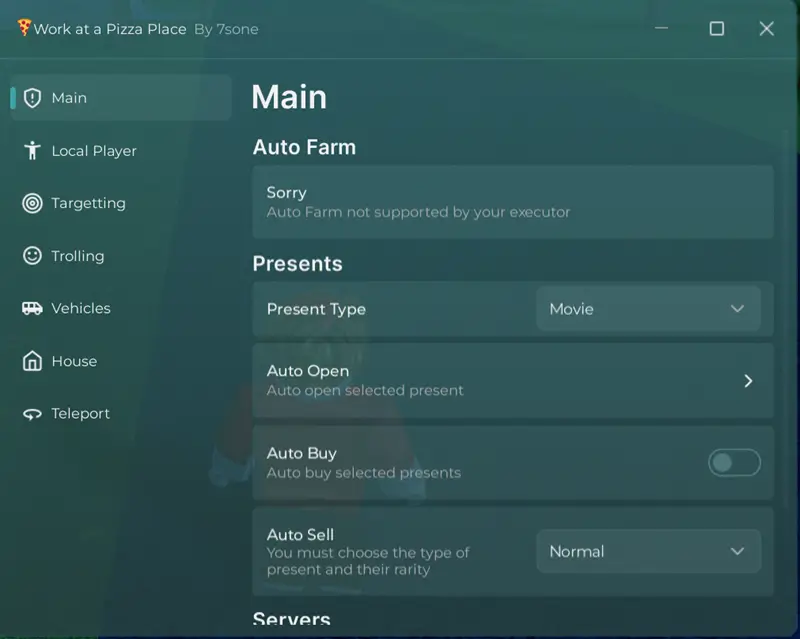
loadstring(game:HttpGet(('https://raw.githubusercontent.com/Hm5011/hussain/refs/heads/main/Work%20at%20a%20pizza%20place'),true))()Work at a Pizza Place Script Troll GUI No Key

loadstring(game:HttpGet("https://raw.githubusercontent.com/blueEa1532/thechosenone/refs/heads/main/trollpizzagui"))()Desire Hub Script Work at a pizza place 2026
loadstring(game:HttpGet("https://raw.githubusercontent.com/welomenchaina/Loader/refs/heads/main/ScriptLoader",true))()Delta Work at a Pizza Script LDS Hub

loadstring(game:HttpGet('https://api.luarmor.net/files/v3/loaders/49f02b0d8c1f60207c84ae76e12abc1e.lua'))()c00lgui Reborn RC7 By vermillion V3rx Script No Key

loadstring(game:HttpGet("https://raw.githubusercontent.com/MiRw3b/c00lgui-v3rx/main/c00lguiv3rx.lua"))()Control NPCs Script for work at a pizza place, Roblox

if patricknpcpanel then return end; patricknpcpanel = true
local github = "https://raw.githubusercontent.com/randomstring0/fe-source/refs/heads/main/NPC"
local load = loadstring(game:HttpGet(github .. "/module.Luau"))()
saved = loadstring(game:HttpGet(github .. "/table.luau"))()
local save = saved or {}
local g2l = load.G2L
local new = load.create()
local lighting = game:GetService("Lighting")
local tweenservice = game:GetService("TweenService")
local rs = game:GetService("RunService")
local ws = game:GetService("Workspace")
local plrs = game:GetService("Players")
local lp = plrs.LocalPlayer
local mouse = lp:GetMouse()
local fast = TweenInfo.new(.5, Enum.EasingStyle.Exponential)
local medium = TweenInfo.new(.67)
local slow = TweenInfo.new(.8)
local rad = 150
local currentnpc
local highlight = Instance.new("Highlight")
highlight.Parent = lp
highlight.FillTransparency = 1
highlight.OutlineTransparency = 1
local light = function(adornee, color)
	task.spawn(function()
		highlight.Adornee = adornee
		highlight.OutlineColor = color
		tweenservice:Create(highlight, medium, {OutlineTransparency  = 0}):Play()
		task.wait(.5)
		tweenservice:Create(highlight, medium, {OutlineTransparency  = 1}):Play()
	end)
end
local isnpc = function(ins)
	local humanoid = ins:FindFirstChildOfClass("Humanoid")
	local player = plrs:GetPlayerFromCharacter(ins)
	if humanoid and not player then
		return ins
	end
	return nil
end
new:mainbutton(save["1"].title, save["1"].des, function()
	if currentnpc then
		local part = currentnpc:FindFirstChild("HumanoidRootPart")
		if part and partowner(part) then
			local hum = currentnpc:FindFirstChildOfClass("Humanoid")
			if hum then
				hum:ChangeState(save["1"].val)
			end
		else
			light(currentnpc, Color3.fromRGB(255, 0, 0))
		end
	end
end)
new:mainbutton(save["2"].title, save["2"].des, function()
	if currentnpc then
		local part = currentnpc:FindFirstChild("HumanoidRootPart")
		if part and partowner(part) then
			if lp and lp.Character then
				local char = lp.Character
				currentnpc:PivotTo(char:GetPivot())
			end
		else
			light(currentnpc, Color3.fromRGB(255, 0, 0))
		end
	end
end)
new:mainbutton(save["3"].title, save["3"].des, function()
	if currentnpc then
		local part = currentnpc:FindFirstChild("HumanoidRootPart")
		if part then
			if lp and lp.Character then
				local char = lp.Character
				char:PivotTo(currentnpc:GetPivot())
			end
		else
			light(currentnpc, Color3.fromRGB(255, 0, 0))
		end
	end
end)
local chr, cons
new:maintoggle(save["4"].title, save["4"].des, function(a)
	if a then
		if currentnpc then
			local part = currentnpc:FindFirstChild("HumanoidRootPart")
			if part and partowner(part) then
				if lp and lp.Character then
					chr = lp.Character
					lp.Character = currentnpc
					ws.CurrentCamera.CameraSubject = currentnpc:FindFirstChild("HumanoidRootPart")
					-- idea from sonle
					local move = 0.01
					cons = rs.PreSimulation:Connect(function()
						local hum = lp.Character:FindFirstChildOfClass("Humanoid")
						if lp.Character and hum then
							hum.RootPart.CFrame += vector.create(0,move,0)
							move = -move
						else
							if cons then
								cons:Disconnect()
								cons = nil
							end
						end
					end)
				end
			else
				light(currentnpc, Color3.fromRGB(255, 0, 0))
			end
		end
	else
		if chr then
			lp.Character = chr
			ws.CurrentCamera.CameraSubject = chr.Humanoid
			chr = nil
			if cons then
				cons:Disconnect()
				cons = nil
			end
		end
	end
end)
new:mainbutton(save["5"].title, save["5"].des, function()
	if currentnpc then
		local part = currentnpc:FindFirstChild("HumanoidRootPart")
		if part and partowner(part) then
			if lp and lp.Character then
				local char = lp.Character
				currentnpc:PivotTo(CFrame.new(0, 1000, 0))
			end
		else
			light(currentnpc, Color3.fromRGB(255, 0, 0))
		end
	end
end)
new:mainbutton(save["6"].title, save["6"].des, function()
	if currentnpc then
		local part = currentnpc:FindFirstChild("HumanoidRootPart")
		if part and partowner(part) then
			local hum = currentnpc:FindFirstChildOfClass("Humanoid")
			if hum then
				hum.Sit = not hum.Sit
			end
		else
			light(currentnpc, Color3.fromRGB(255, 0, 0))
		end
	end
end)
new:mainbutton(save["7"].title, save["7"].des, function()
	if currentnpc then
		local part = currentnpc:FindFirstChild("HumanoidRootPart")
		if part and partowner(part) then
			local hum = currentnpc:FindFirstChildOfClass("Humanoid")
			if hum then
				hum:ChangeState(save["7"].val)
			end
		else
			light(currentnpc, Color3.fromRGB(255, 0, 0))
		end
	end
end)
local con, follownpc
follownpc = new:maintoggle(save["8"].title, save["8"].des, function(a)
	if a then
		con = rs.RenderStepped:Connect(function()
			if currentnpc then
				local part = currentnpc:FindFirstChild("HumanoidRootPart")
				if part and partowner(part) then
					local hum = currentnpc:FindFirstChildOfClass("Humanoid")
					if hum then
						local hrp=lp.Character:FindFirstChild("HumanoidRootPart")
						if hrp then
							hum:MoveTo(hrp.Position + Vector3.new(-4,0,0))
						end
					end
				else
					light(currentnpc, Color3.fromRGB(255, 0, 0))
					if con then
						follownpc:swich(false)
						con:Disconnect()
						con = nil
					end
				end
			else
				if con then
					follownpc:swich(false)
					con:Disconnect()
					con = nil
				end
			end
		end)
	else
		if con then
			con:Disconnect()
			con = nil
		end
	end
end)
local con1
new:extratoggle(save["9"].title, function(a)
	if a then
		con1 = rs.Stepped:Connect(function()
			local hrp1 = lp.Character and lp.Character:FindFirstChild("HumanoidRootPart")
			if not hrp1 then return end
			local nbp = ws:GetPartBoundsInRadius(hrp1.Position, 13)
			for _, part in pairs(nbp) do
				local model = part:FindFirstAncestorOfClass("Model")
				if model and isnpc(model) then
					local npc = model
					local hrp = npc:FindFirstChild("HumanoidRootPart")
					if hrp and partowner(hrp) and not hrp.Anchored and npc ~= lp.Character then
						local hum = npc:FindFirstChildOfClass("Humanoid")
						if hum then
							hum:ChangeState(save["9"].val)
						end
					end
				end
			end
		end)
	else
		if con1 then
			con1:Disconnect()
			con1 = nil
		end
	end
end)
local con2
new:extratoggle(save["10"].title, function(a)
	if a then
		con2 = rs.Stepped:Connect(function()
			local hrp1 = lp.Character and lp.Character:FindFirstChild("HumanoidRootPart")
			if not hrp1 then return end
			local nbp = ws:GetPartBoundsInRadius(hrp1.Position, 13)
			for _, part in pairs(nbp) do
				local model = part:FindFirstAncestorOfClass("Model")
				if model and isnpc(model) then
					local npc = model
					local hrp = npc:FindFirstChild("HumanoidRootPart")
					if hrp and partowner(hrp) and not hrp.Anchored and npc ~= lp.Character then
						local hum = npc:FindFirstChildOfClass("Humanoid")
						if hum then
							hum:ChangeState(save["10"].val)
						end
					end
				end
			end
		end)
	else
		if con2 then
			con2:Disconnect()
			con2 = nil
		end
	end
end)
mouse.Button1Down:Connect(function()
	if clicknpc and mouse.Target and mouse.Target.Parent:FindFirstChild("HumanoidRootPart") then
		if mouse.Target.Parent:FindFirstChild("HumanoidRootPart").Anchored == false then
			if not plrs:GetPlayerFromCharacter(mouse.Target.Parent) then
				if partowner(mouse.Target.Parent:FindFirstChild("HumanoidRootPart")) then
					currentnpc = mouse.Target.Parent
					light(currentnpc, Color3.fromRGB(0, 255, 0))
				else
					light(mouse.Target.Parent, Color3.fromRGB(255, 0, 0))
				end
			end
		else
			light(mouse.Target.Parent, Color3.fromRGB(255, 0, 0))
		end
	end
end)
rs.RenderStepped:Connect(function()
	if sethiddenproperty then
		sethiddenproperty(lp,"SimulationRadius",rad)
	else
		lp.SimulationRadius=rad
	end
end)
return g2l, require;
Toaster Lag Maschine Script No Key

loadstring(game:HttpGet('https://raw.githubusercontent.com/mze222/Toaster-/refs/heads/main/tda'))()Script For Work At a Pizza Place Entity Hub - No Key

loadstring(game:HttpGet('https://pastefy.app/31QRTZYB/raw'))()Work At The Pizza Place OP Mango Hub - No Key

loadstring(game:HttpGet(‘https://raw.githubusercontent.com/idislikebluecheese/MangoHubScripts/refs/heads/main/watpp.lua’))()
How to run the Roblox Work at a Pizza Place Script?
To run the Xeno Work at a Pizza Place script and use all these extra features, you need a Roblox script executor. Follow the steps below:
- First of all, go to xeno-executors.org and download latest version of Xeno on your Windows or laptop.
- Now extract the zip folder and open the exe file.
- Open the Roblox app on PC and sign in, then search for the Work at a Pizza Place game and hit the Play button.
- Click Xeno, then click the attach button to link the executor to the Roblox client.
- Copy any keyless Work at a Pizza Place scripts from the above list and paste them into Xeno.
- Click the Execute button and wait for the script to load.
- A script UI will load where you can enable any features.
FAQs
The Work at a Pizza Script is a tiny Lua script used to auto-farm tasks, auto-upgrade items, auto-dig, auto-collect pollen/honey, and more.
To use these scripts on a Windows PC, you can use Xeno Executor. Mobile users can use Delta, Ronix, or Arceus to use these scripts.
Yes. These scripts are safe to use on mobile or PC. However, it is recommended to test them on a newly made Roblox account.
No. Xeno-supported scripts are keyless, while others require a key. But the process to get the key is very easy.