Working Throwing Simulator script is very hard to find, especially one that is keyless and supports almost all Roblox executors. Here we have listed only verified scripts for the Roblox Throwing Simulator game.
These scripts add extra features like Auto Throw, Auto Farm, Camera set, Auto Equip Best, Auto Throwing, Pet enchant, Auto Rebirth, Auto Upgrade, Teleport Portal, Open (Golden Machine, Rainbow machine), and Anti AFK.
All Xeno Throwing Simulator Script
ScriptsRBX - Script Throwing Simulator [NO KEY]
loadstring(game:HttpGet("https://raw.githubusercontent.com/ScriptsRBXdotCom/scripts/refs/heads/main/throwingsimulator"))()Demon Challenger Hub - Throwing Simulator Roblox Script
loadstring(game:HttpGet(('https://pastebin.com/raw/KLnFvjCW'),true))()Shine Blade Throwing Simulator No Key Script
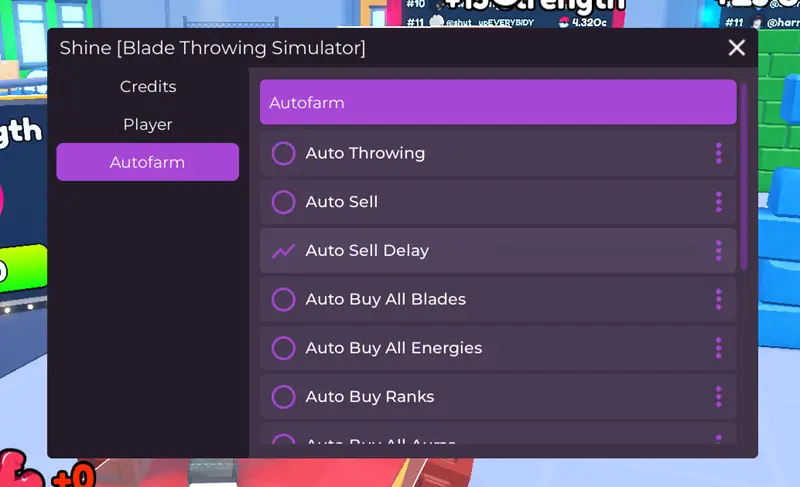
loadstring(game:HttpGet("https://www.scriptblox.com/raw/UI-or-A-Bunch-of-features_61", true))();
Fechar TP - Blade Throwing Simulator No Key Script

local player = game.Players.LocalPlayer
local TweenService = game:GetService("TweenService")
local UIS = game:GetService("UserInputService")
local gui = Instance.new("ScreenGui", player:WaitForChild("PlayerGui"))
gui.Name = "PortalTP_UI"
gui.ResetOnSpawn = false
local toggle = Instance.new("TextButton", gui)
toggle.Size = UDim2.new(0,120,0,30)
toggle.Position = UDim2.new(0,20,0.5,-160)
toggle.Text = "Abrir TP"
toggle.BackgroundColor3 = Color3.fromRGB(35,35,35)
toggle.TextColor3 = Color3.new(1,1,1)
Instance.new("UICorner", toggle)
local frame = Instance.new("Frame", gui)
frame.Size = UDim2.new(0,220,0,0)
frame.Position = UDim2.new(0,20,0.5,-120)
frame.BackgroundColor3 = Color3.fromRGB(20,20,20)
frame.BorderSizePixel = 0
Instance.new("UICorner", frame)
local title = Instance.new("TextLabel", frame)
title.Size = UDim2.new(1,0,0,30)
title.BackgroundTransparency = 1
title.Text = "PORTAL TP"
title.TextColor3 = Color3.new(1,1,1)
title.Font = Enum.Font.GothamBold
title.TextSize = 14
local scroll = Instance.new("ScrollingFrame", frame)
scroll.Position = UDim2.new(0,0,0,30)
scroll.Size = UDim2.new(1,0,1,-30)
scroll.BackgroundTransparency = 1
scroll.ScrollBarThickness = 4
scroll.CanvasSize = UDim2.new(0,0,0,0)
local layout = Instance.new("UIListLayout", scroll)
layout.Padding = UDim.new(0,5)
local function tp(part)
    local char = player.Character or player.CharacterAdded:Wait()
    local hrp = char:WaitForChild("HumanoidRootPart")
    hrp.CFrame = part.CFrame + Vector3.new(0,5,0)
end
local aberto = false
toggle.MouseButton1Click:Connect(function()
    aberto = not aberto
    if aberto then
        toggle.Text = "Fechar TP"
        TweenService:Create(frame, TweenInfo.new(0.25, Enum.EasingStyle.Quad), {
            Size = UDim2.new(0,220,0,300)
        }):Play()
    else
        toggle.Text = "Abrir TP"
        TweenService:Create(frame, TweenInfo.new(0.25, Enum.EasingStyle.Quad), {
            Size = UDim2.new(0,220,0,0)
        }):Play()
    end
end)
local portals = workspace:FindFirstChild("Portals")
if portals then
    for _,p in pairs(portals:GetChildren()) do
        local btn = Instance.new("TextButton", scroll)
        btn.Size = UDim2.new(1,-10,0,30)
        btn.BackgroundColor3 = Color3.fromRGB(40,40,40)
        btn.TextColor3 = Color3.new(1,1,1)
        btn.Text = p.Name
        Instance.new("UICorner", btn)
        btn.MouseButton1Click:Connect(function()
            local part = p:FindFirstChildWhichIsA("BasePart")
            if part then
                tp(part)
            end
        end)
    end
    task.wait()
    scroll.CanvasSize = UDim2.new(0,0,0,layout.AbsoluteContentSize.Y + 10)
end
Visionware - Throwing Simulator Script [Key System]
loadstring(game:HttpGet("https://raw.githubusercontent.com/vrsionn/visionware/refs/heads/main/loader"))()What is the Throwing Simulator Script?
The Throwing Simulator Script is an automation tool written in safe Lua code that helps automate tasks in the game. Using these scripts, you can auto-throw, auto-train, and upgrade without wasting time.
Additionally, these scripts also give you Auto Throw, Auto Farm, Auto Rebirth, Fast Train, and Teleport Portal features.
To run the Throwing Simulator Script, you need a Roblox executor like Xeno or Delta. These scripts are PC & mobile supported and are keyless.
How to Use the Throwing Simulator Script?
To run the Xeno Throwing Simulator script and use all these extra features, you need a Roblox script executor. Follow the steps below:
- First of all, go to xeno-executors.org and download latest version of Xeno on your Windows or laptop.
- Now extract the zip folder and open the exe file.
- Open the Roblox app on PC and sign in, then search for the Throwing Simulator game and hit the Play button.
- Click on Xeno and click the attach button that will link the executor with the Roblox client.
- Copy any keyless Throwing Simulator scripts from the above list and paste it into Xeno.
- Click the Execute button and wait for the script to load.
- A script UI will load where you can enable any features.
FAQs
Is the Throwing Simulator Script safe to use?
YES. These scripts are verified manually using the Xeno executor. There is no need to worry about safety issues.
Can I use these scripts on mobile?
Sure, you can use these scripts even on an Android mobile. To use them on mobile, download the Delta APK app.
Do Throwing Simulator Scripts need a key?
Most of the scripts we provide are Keyless!! But some Roblox scripts may have a key system.