Looking for a working Cool Gym Game script? Here we have provided you with a list of working scripts of the Cool Gym Game Roblox game. You can power up your bench press, squat, and deadlift training instantly without losing stamina.
You can also unlock many more features like Auto farm, Become fat fast, Auto train, Auto Lift, auto repetition counters, infinite Stamina, Climb leaderboards, Farm strength points, and Teleport, which will make your gameplay exciting.
All Cool Gym Game Scripts 2026
Titan Hub - Script Cool Gym Game (NO KEY)

loadstring(game:HttpGet('https://raw.githubusercontent.com/chillunsk/titan-hub/refs/heads/main/titan%20hub'))()L4BIB Hub Cool Gym Game No Key Script
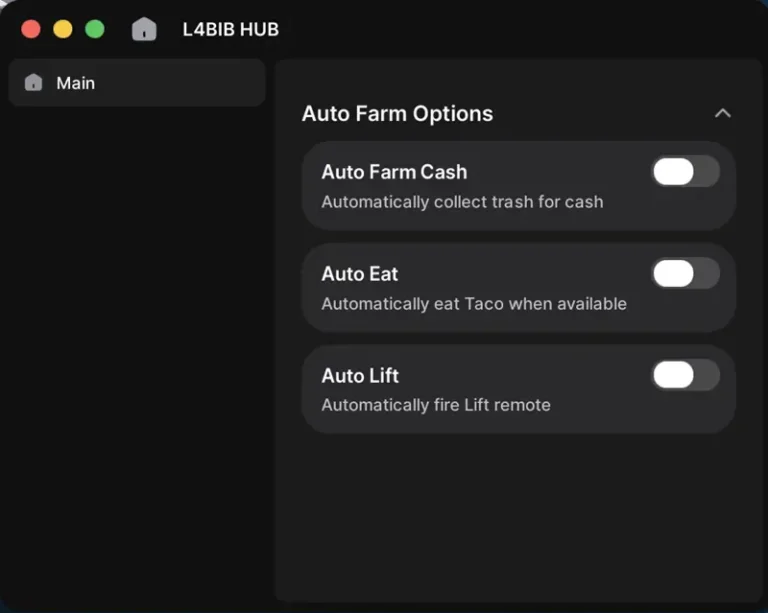
-- WindUI Auto Farm Script
-- Load WindUI
local WindUI = loadstring(game:HttpGet("https://raw.githubusercontent.com/Footagesus/WindUI/main/dist/main.lua"))()
-- Globals Table
getgenv().FarmSettings = {
    AutoFarmCash = false,
    AutoEat = false,
    AutoLift = false,
}
-- ========================
-- UI Setup
-- ========================
local Window = WindUI:CreateWindow({
    Title = "L4BIB HUB",
    Folder = "",
    Icon = "solar:home-2-bold",
    NewElements = true,
    HideSearchBar = true,
    OpenButton = {
        Title = "Auto Farm",
        CornerRadius = UDim.new(1, 0),
        StrokeThickness = 2,
        Enabled = true,
        Draggable = true,
        OnlyMobile = false,
        Scale = 0.5,
        Color = ColorSequence.new(
            Color3.fromHex("#30FF6A"),
            Color3.fromHex("#e7ff2f")
        )
    },
    Topbar = {
        Height = 44,
        ButtonsType = "Mac",
    },
})
-- Disable all farms when UI is closed/destroyed
Window.OnDestroy = function()
    for key, value in pairs(getgenv().FarmSettings) do
        if type(value) == "boolean" then
            getgenv().FarmSettings[key] = false
        end
    end
end
local MainTab = Window:Tab({
    Title = "Main",
    Icon = "solar:home-2-bold",
})
local MainSection = MainTab:Section({
    Title = "Auto Farm Options",
})
-- Auto Farm Cash Toggle
MainSection:Toggle({
    Flag = "AutoFarmCash",
    Title = "Auto Farm Cash",
    Desc = "Automatically collect trash for cash",
    Value = false,
    Callback = function(state)
        getgenv().FarmSettings.AutoFarmCash = state
        if state == true then
            for _, v in pairs(workspace.TrashLocations:GetDescendants()) do
                if v:IsA("Model") and v:FindFirstChild("ProximityPrompt") then
                    game.Players.LocalPlayer.Character:MoveTo(v:GetModelCFrame().Position)
                    task.wait(0.25)
                    fireproximityprompt(v.ProximityPrompt)
                end
            end
        end
        WindUI:Notify({
            Title = "Auto Farm Cash",
            Content = state and "Enabled" or "Disabled",
            Icon = state and "check" or "x",
            Duration = 2,
        })
    end
})
MainSection:Space()
-- Auto Eat Toggle
MainSection:Toggle({
    Flag = "AutoEat",
    Title = "Auto Eat",
    Desc = "Automatically eat Taco when available",
    Value = false,
    Callback = function(state)
        getgenv().FarmSettings.AutoEat = state
        WindUI:Notify({
            Title = "Auto Eat",
            Content = state and "Enabled" or "Disabled",
            Icon = state and "check" or "x",
            Duration = 2,
        })
    end
})
MainSection:Space()
-- Auto Lift Toggle
MainSection:Toggle({
    Flag = "AutoLift",
    Title = "Auto Lift",
    Desc = "Automatically fire Lift remote",
    Value = false,
    Callback = function(state)
        getgenv().FarmSettings.AutoLift = state
        WindUI:Notify({
            Title = "Auto Lift",
            Content = state and "Enabled" or "Disabled",
            Icon = state and "check" or "x",
            Duration = 2,
        })
    end
})
-- ========================
-- Auto Farm Cash Logic
-- ========================
for _, part in workspace.TrashLocations:GetChildren() do
    if part:IsA("Part") then
        part.ChildAdded:Connect(function(child)
            if getgenv().FarmSettings.AutoFarmCash then
                game.Players.LocalPlayer.Character:MoveTo(child:GetModelCFrame().Position)
                task.wait(0.25)
                fireproximityprompt(child.ProximityPrompt)
            end
        end)
    end
end
-- ========================
-- Auto Eat Logic
-- ========================
spawn(function()
    while task.wait() do
        if getgenv().FarmSettings.AutoEat then
            local p = game.Players.LocalPlayer
            local taco = p.Backpack:FindFirstChild("Taco") or (p.Character and p.Character:FindFirstChild("Taco"))
            if taco then
                if taco.Parent == p.Backpack then taco.Parent = p.Character end
                taco:Activate()
            else
                game.Players.LocalPlayer.Character:MoveTo(workspace.Handle.Position)
                task.wait(0.25)
                fireproximityprompt(workspace.Handle.ProximityPrompt)
                task.wait(0.25)
            end
        end
    end
end)
-- ========================
-- Auto Lift Logic
-- ========================
spawn(function()
    local remote = game:GetService("ReplicatedStorage"):WaitForChild("Lift")
    while task.wait() do
        if getgenv().FarmSettings.AutoLift then
            remote:FireServer("Lift")
        end
    end
end)
AtherHub Gym League Script
loadstring(game:HttpGet("https://raw.githubusercontent.com/Athergaming/Roblox-Gym-League-Script/main/AtherHub%20Gym%20League%20V1_5.lua"))() Best Gym Game Script [Key System]
loadstring(game:HttpGet("https://raw.githubusercontent.com/AllFilmOffical/Untitled-Mobile-Gym-Game-/main/Script"))()What is Cool Gym Game Script?
The Cool Gym Game Script is a Lua-based, tiny automation tool that helps you automate training in the gym. This Lua tool provides you with many new features, i.e., Auto farming, auto training, auto fat, Auto left, auto bench, teleport that enhane you gameplay. This Xeno script will boost your gym training and exercise completely.
To use these Lua tools, you need a Roblox executor like Xeno Executor on PC. You can also run the Cool Gym Script with Delta, Arceus X, FluxusZ, Ronix, Velocity, Solara, and more. Works across Windows, macOS, iOS, and Android platforms!!
How to run the Roblox Cool Gym Game Script?
To run the Xeno Cool Gym Game script and use all these extra features, you need a Roblox script executor. Follow the steps below:
- First of all, go to xeno-executors.org and download latest version of Xeno on your Windows or laptop.
- Now extract the zip folder and open the exe file.
- Open the Roblox app on PC and sign in, then search for the Cool Gym Game game and hit the Play button.
- Click on Xeno and click the attach button that will link the executor with the Roblox client.
- Copy any keyless Cool Gym Game scripts from the above list and paste them into Xeno.
- Click the Execute button and wait for the script to load.
- A script UI will load where you can enable any features.
FAQS
To use these scripts, you need a Robox Executor on your PC or Mobile, and then paste the above script in there.
YES. It’s safe to USE, but we still recomend to TRY Scripts on an alt Roblox account.
Yes! The above scripts work on Mobile, PC, and even on iOS devices.
NO. All scripts are keyless except the last one.
Auto training, auto lifting, leaderboard climbing, strength farming, infinite stamina, and anti-kick protection!!