
Looking for Bloxstrike keyless script to enance you gameplay! Here we have listed the verified and working script for the BloxStrike Roblox game. Our handpicked scripts provide you with Auto kill, Auto Farm, Silent Aimbot, Headshot, ESP, Ragebot, and more features.
Now you can take control of the battlefield outcome by easily locating and defeating enemies. These scripts work well with Xeno executor, while some of them work fine on Delta.
All Working Bloxstrike Script in 2026
Xeno Chair Hub Universal Aimbot Script

loadstring(game:HttpGet("https://raw.githubusercontent.com/ReWelp/ChairHub./refs/heads/main/universalaimbot.lua", true))()Neverlose Xeno Alpha Build BloxStrike Script No Key

loadstring(game:HttpGet("https://raw.githubusercontent.com/muradholmatov307-dev/Neverlose/refs/heads/main/NeverloseAlpha"))()Xeno Wyvern GUI Bloxstrike Script No Key
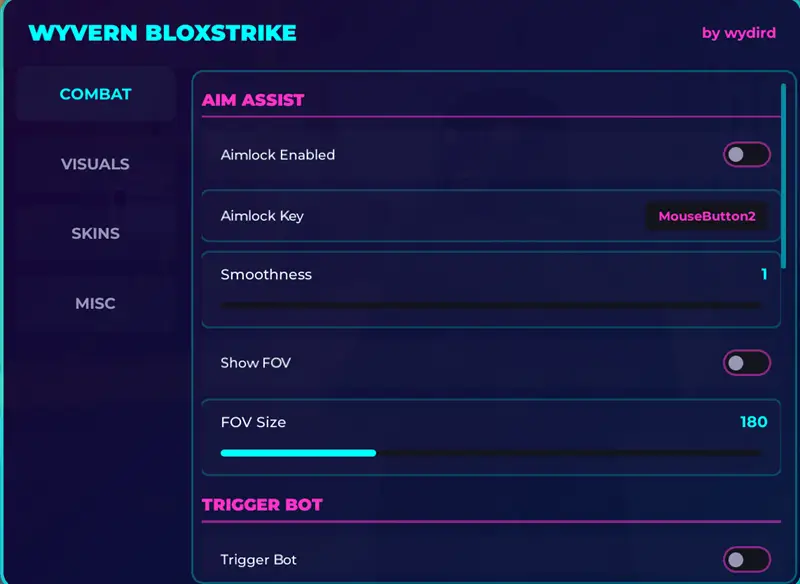
loadstring(game:HttpGet("https://gist.githubusercontent.com/wydirdscripts/9eca68020f16e51d6ad9ab736e793019/raw/f06aca535da16f8c8e5795d0532fa4df1ac0e97e/obfuscated_script-1770322002434.lua"))()Xeno Meteor ESP Drawing Method

loadstring(game:HttpGet("https://pastefy.app/5CXUKsr8/raw", true))()Xeno BloxStrike script – Polo V1 No Key
loadstring(game:HttpGet("https://raw.githubusercontent.com/polo242c/bloxstrike/refs/heads/main/blox"))()Expectional Hub - Script Blox Strike (No Key)
loadstring(game:HttpGet("https://expectional.dev/loadstring/Blox-Strike.lua"))()Panda Dev - Blox Strike Script Legit & Rage
getgenv().skipload = true; getgenv().AUTOLOAD = nil; loadstring(game:HttpGet("https://pandadevelopment.net/virtual/file/f46a7eb5a71f1048"))()NickHub - Tracking Suite
loadstring(game:HttpGet("https://raw.githubusercontent.com/Nickk-GG/BloxStrike-NickHub/refs/heads/main/101.lua"))()SkinChanger Script For Blox Strike
loadstring(game:HttpGet("https://expectional.dev/loadstring/Blox-Strike-Skinchanger.lua"))()Spectre - Strike Edition
loadstring(game:HttpGet('https://raw.githubusercontent.com/Zylang104/BloxStrike/refs/heads/main/main.lua'))()What is BloxStrike Script
A Xeno Script For Bloxscript is an automation tool developed in the Lua language that provides plenty of automated features that make your game more exciting. The main goal of these scripts is to react, aim, and fight faster without wasting time.
The primary purpose of it is to perform quick reactions using unique tools without manual effort. These scripts are used via Roblox script executor, e.g., Xeno or Delta. It gives auto-aiming, ESP visibility, auto-shooting target, and visual effects that make the gameplay easier and faster
How to run the Roblox BloxStrike Script?
To run the Xeno BloxStrike script and use all these extra features, you need a Roblox script executor. Follow the steps below:
- First of all, go to xeno-executors.org and download latest version of Xeno on your Windows or laptop.
- Now extract the zip folder and open the exe file.
- Open the Roblox app on PC and sign in, then search for the BloxStrike game and hit the Play button.
- Click on Xeno and click the attach button that will link the executor with the Roblox client.
- Copy any keyless BloxStrike scripts from the above list and paste them into Xeno.
- Click the Execute button and wait for the script to load.
- A script UI will load where you can enable any features.
FAQs
The Blox Strike Script is a tiny Lua code that is used to Auto farm tasks, auto kill enemies, Set Auto Aimbot, Silent aimbot, and more features.
To use these scripts on a Windows PC, you can use Xeno Executor. Mobile users can use Delta, Ronix, or Arceus to use these scripts.
es. These scripts are safe to use on mobile or PC. Still, it is recommended to test them on a newly made Roblox account.
Not always. Xeno-supported scripts are keyless, while others require a key. But the process to get the key is very easy.
thanks for the podt. scripts are amazing and working with Xeno executor
How to use them?
best bloxstrike script i have found.